Boardable Groups & Committees
All In One Board Committee Management Software
Create Team-Focused Workspaces to Maximize Productivity
Give the right people access to the right information before, during, and after every board meeting. Boardable Groups is board committee management software that gives nonprofit boards, committees, and task forces a central workspace for meetings, documents, polls, and collaboration.
See it in Action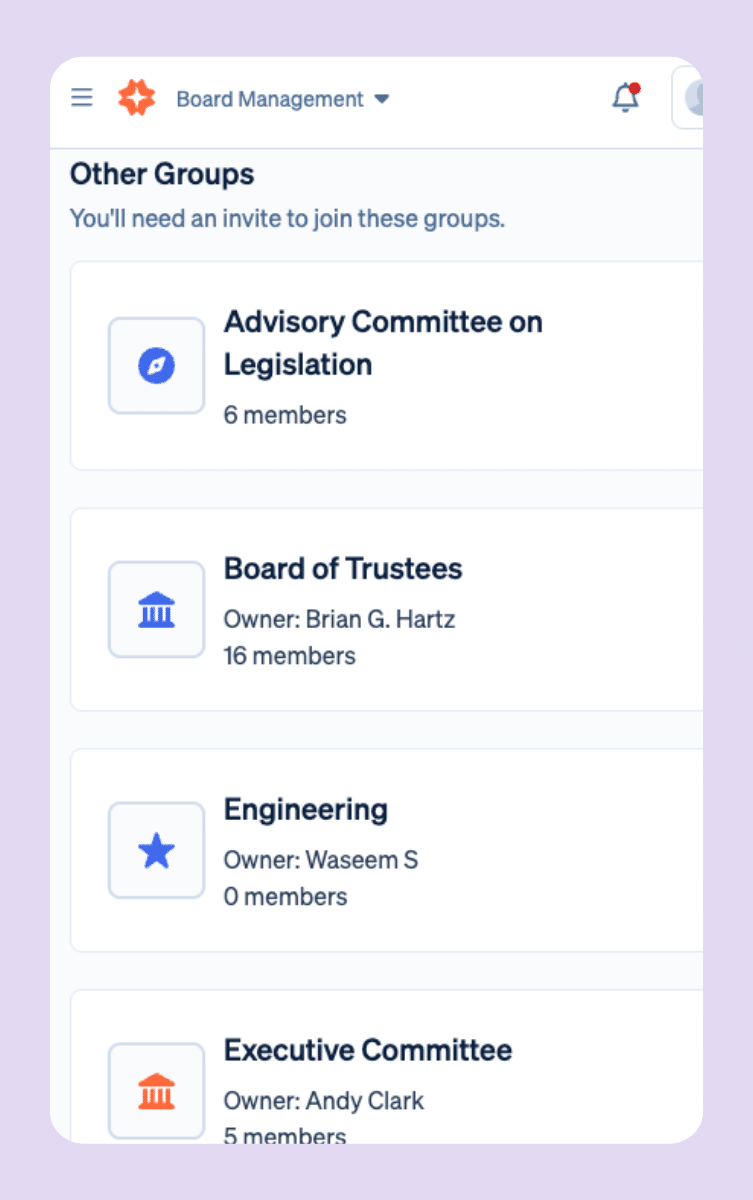
Feature Highlights
Organize Work by Board, Committee, or Task Force
Create a dedicated home for every sub-board and committee—where agendas, files, conversations, tasks, and decisions live together unifying people working toward a common mission.
Keep Collaboration Moving Between Meetings
Help your committees make progress in real time, not just at the monthly meeting.
Discussions
Spin up discussion threads inside a group to review materials, ask questions, and keep decisions on track. Include a whole group, then fine-tune participants at the individual level when needed.
Polls & Decisions
Run quick polls between meetings to collect feedback, test consensus, or formalize motions, without long email chains.
Task & Goals
Assign tasks to individuals or entire groups, set due dates, and monitor progress. Track board-level and committee goals in one place to keep accountability visible.
Built for Nonprofit Boards and Committees
Boardable Groups are purpose-built for governance where clarity, accountability, and inclusion matter.
Make Transitions Smoother & Preserve Continuity
Boards evolve—roles change, leaders rotate, and new members join. Boardable Groups keep history centralized so new stakeholders can see past meetings, files, and decisions while respecting role-based access. It’s your single source of truth through handoffs and leadership transitions.
FAQs
Boardable Groups & Committees — Frequently Asked Questions
What’s the difference between a Group and a Meeting?
A Group is an ongoing workspace (with meetings, documents, discussions, tasks, polls, goals, and members). A Meeting is a single event connected to a group, with its own agenda, minutes, and attendees. For nonprofits managing multiple committees, this structure is what makes Boardable’s group workspace software useful: everything belongs somewhere, and nothing gets lost between sessions.
What can members do inside a Group?
Group members can upload and access documents, participate in discussions, vote in polls, complete tasks, track goals, and view upcoming meetings. For nonprofit committee management, this means all the work happens in one place rather than scattered across email threads and shared drives. Admins and owners have additional permissions, like managing membership and editing group settings, but every member has what they need to contribute between meetings, not just during them.
Will new members see past content?
By default, new members will see all current group documents, goals, and meetings. If access is needed to past discussions, tasks, and polls, you can always manually add the new member to those items. This gives your organization control over how much historical context to share during a transition, without overwhelming someone on their first day.
Can groups collaborate across committees?
Members can belong to multiple Groups in Boardable, so someone sitting on both the finance committee and the executive committee has access to both workspaces without any extra setup. Each Group keeps its own content separate, but individuals can move between them freely. For organizations managing layered committee workspace management across a full board structure, this means the right people always have the right access, and nothing ends up where it shouldn’t.
Integrations
Plays Well with Your Tech. Backed by a Team That Gets Governance.
Boardable connects easily with the tools you already use—no IT ticket required. Plus, 24/7 help center and a dedicated Success team trained on nonprofit governance.





Compliance
Compliance-Ready From
Day One
-
Soc 2 Type II

-
WCAG-AA accessibility

-
HIPAA Compliant

- Single-Sign-On
- Roles & permissions
- Two-Way Encryption
- GDPR
Free Resources for Nonprofit Professionals
 Lauren Emmons • May 11, 2026
School Board Governance Committee
For education leaders seeking a charter school to participate in, you may wonder: “is there a charter school near me?” If you search for a charter school and land on a CDE charter school directory, your next steps should include educating yourself on how your commitment to a board…
 Lauren Emmons • May 11, 2026
3 Strategic Planning Lessons That Taught Me How Much Risk is Hiding in School Board Meetings
That experience taught me more than I anticipated, not just about strategy, but about the vulnerabilities that surface when governance isn’t supported by the right infrastructure. Let me explain. Lesson One: Disorganization in School Board Meetings Isn’t Just Frustrating—It’s Risky In one session, we paused…
 Lavon Simpson • July 8, 2026
Why Board Meeting Agendas Are So Important
Great Board Meetings Start with a Great Agenda A well-planned agenda sets the tone for every board meeting, helping members stay focused, prepare in advance, and make informed decisions. Whether you’re leading a nonprofit or corporate board, a consistent agenda keeps discussions organized and meetings on track. A board…
